HW9 – Summary Post
Time Log – Teams’ Sites
(Time spent visiting and commenting on other Teams’ sites)
Date: Mar. 03, 2026 From: 06:15pm To: 06:27pm
Date: Mar. 05, 2026 From: 10:05am To: 10:17am
Date: Mar. 06, 2026 From: 07:10pm To: 07:21pm
Time Log – Students’ Sites
(Time spent visiting and commenting on other students’ sites)
Date: Mar. 05, 2026 From: 10:15am To: 10:26am
Date: Mar. 05, 2026 From: 07:30pm To: 07:41pm
Date: Mar. 06, 2026 From: 10:30am To: 10:42am
Date: Mar. 06, 2026 From: 06:10pm To: 06:21pm
Essay I – Summary of Content Activities
This week, I created two new in-depth blog posts exploring the latest and most impactful trends in artificial intelligence for 2026. The first post covers Vibe Coding, a revolutionary shift in software development where anyone regardless of coding experience, can build fully functional apps simply by describing what they want in plain English, powered by tools like Cursor, GitHub Copilot, and Replit AI. The second post explores Small Language Models (SLMs), explaining how compact AI models like Microsoft’s Phi-4 Mini and Meta’s LLaMA 3.2 are outperforming bloated large models by running directly on devices, delivering faster, cheaper, and more privacy-friendly AI experiences. Both posts include properly cited images, have comments enabled for visitors, and have been assigned relevant categories and tags. I updated the General Menu to reflect both new posts under the AI category and added them to the HW9 section of the HWs Menu for grading purposes. Additionally, I visited all Teams’ and students’ sites throughout the week, leaving thoughtful comments on posts I found engaging, and moderated and approved all incoming comments on my site through the WordPress admin dashboard.
New Content Published This Week:
- Vibe Coding – When Anyone Can Build Software Without Writing a Single Line of Code
- Small Language Models – Why Smaller AI Is the Smartest Move in 2026
Essay II – Summary of Automated Insights
This week, I explored the Automated Insights feature in Google Analytics 4, which uses machine learning to automatically detect unusual changes and emerging trends in site data. I accessed automated insights through Method I – the Home section of the GA4 reporting dashboard where the Insights panel displayed automatically generated observations about my site’s traffic patterns. One notable insight flagged by GA4 was an unusual spike in active users during the week, which Analytics Intelligence attributed to increased engagement from new blog post publications. I also explored the Search Bar (Method III) by typing keywords like “traffic” and “sessions” to surface additional suggestions from Analytics Intelligence. The automated insights panel provided a clear, visual summary of what changed, why it might have changed, and how it compared to previous periods — without requiring any manual report configuration. This feature is particularly powerful for monitoring site health passively, as it alerts you to significant changes without you having to check every report manually.
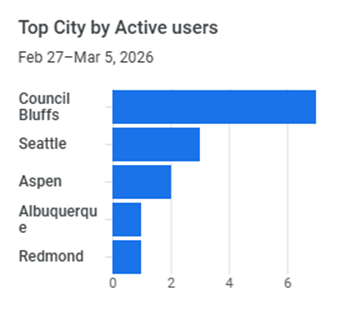
i) What are top cities by users?
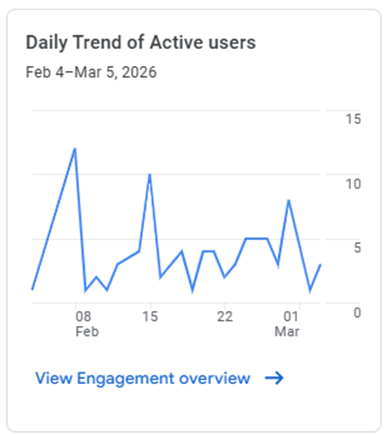
ii) What’s the Daily Trend Of Active Users?
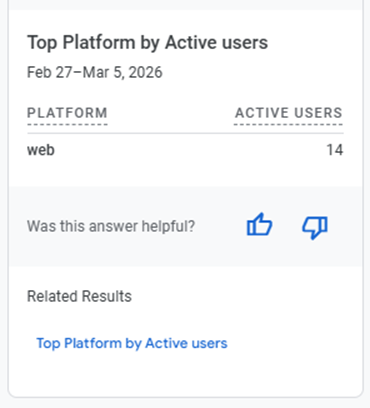
iii) What platforms are used the most?
Essay III – Summary of Custom Insights
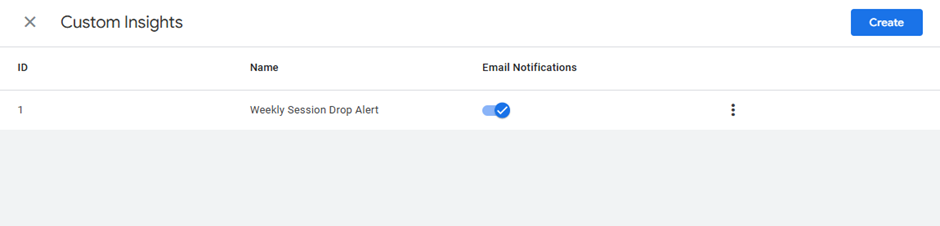
This week, I created a Custom Insight in Google Analytics 4 to monitor a specific KPI relevant to my site’s goals. I navigated to the Insights section in GA4 and selected Method II – Start from Scratch to define my own custom insight rules. I configured the insight with the following parameters: Evaluation Frequency set to Weekly, Segment set to All Users, and the Condition set to trigger when the number of Sessions decreases by more than 20% compared to the previous week. This custom insight is designed to immediately alert me if site traffic drops significantly, an early warning system that allows me to react quickly by publishing new content or reviewing any technical issues on the site. I also enabled the email alert option so that GA4 automatically sends a notification to my email whenever this condition is met. Once saved, the custom insight appeared in the Insights dashboard and will activate as soon as the defined threshold is crossed. Custom insights proved to be a highly valuable tool for turning raw analytics data into actionable, goal-oriented monitoring.
Alert me when Sessions decrease by more than 20% compared to the previous week
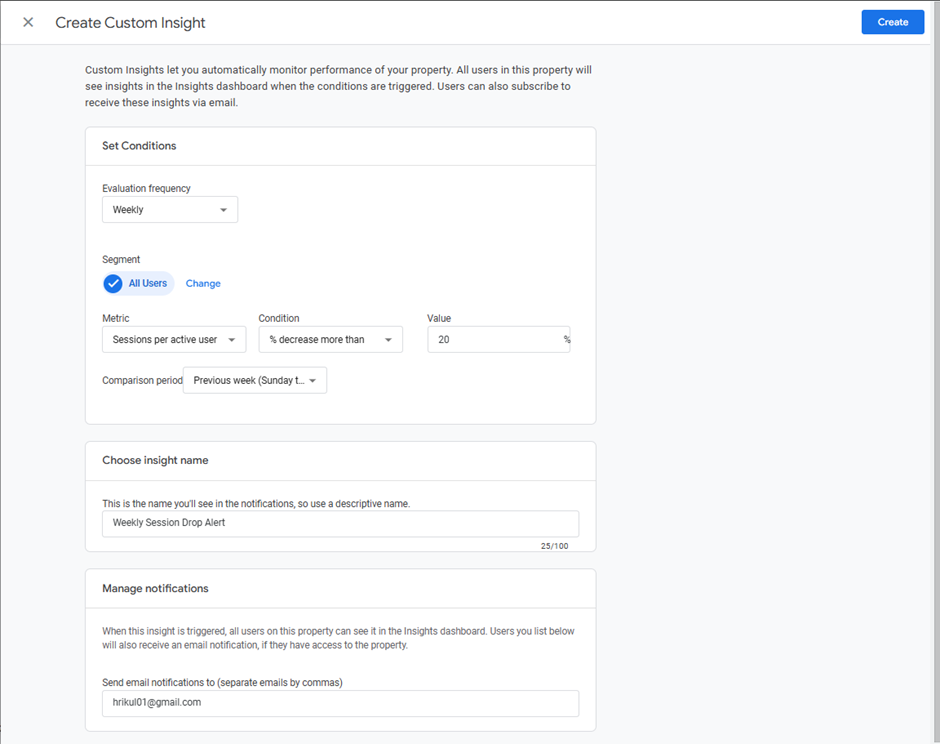
Custom Insight Created Successfully
Leave a Reply